
What Is a Cold Wallet? The Complete Guide to Offline Crypto Security
## What Is a Cold Wallet? The Short Answer
A cold wallet is a cryptocurrency hardware wallet that stores your private keys **entirely offline** — disconnected from the internet and out of reach from hackers, malware, and phishing attacks. Unlike a hot wallet (which lives on your phone or computer and stays connected online), a cold wallet never exposes your private keys to an internet-connected environment.
When you hold crypto on an exchange or in a hot wallet, you are trusting a third party with your private keys. With a cold wallet, **you alone control your keys** — a concept called self-custody. This is the fundamental difference between “holding” your crypto and truly owning it.
If you’re serious about protecting your Bitcoin, Ethereum, or any cryptocurrency worth more than a few hundred dollars, a cold wallet is not optional. It’s the minimum standard of responsible ownership.
**Affiliate Disclosure:** Some links on this page are affiliate links. If you purchase through them, we may earn a commission at no extra cost to you. Our editorial content is not influenced by affiliate partnerships.
—
## How Does a Cold Wallet Work? A Step-by-Step Breakdown
Understanding how cold wallets work makes it easier to appreciate why they are so much more secure than software wallets or exchange accounts.
### 1. Key Generation Happens Offline
When you first set up your cold wallet, it generates your **private keys** on the device itself — completely offline. This process, often called “air-gapped” generation, means your keys never exist on any internet-connected device, even temporarily.
### 2. Transactions Are Signed on the Device
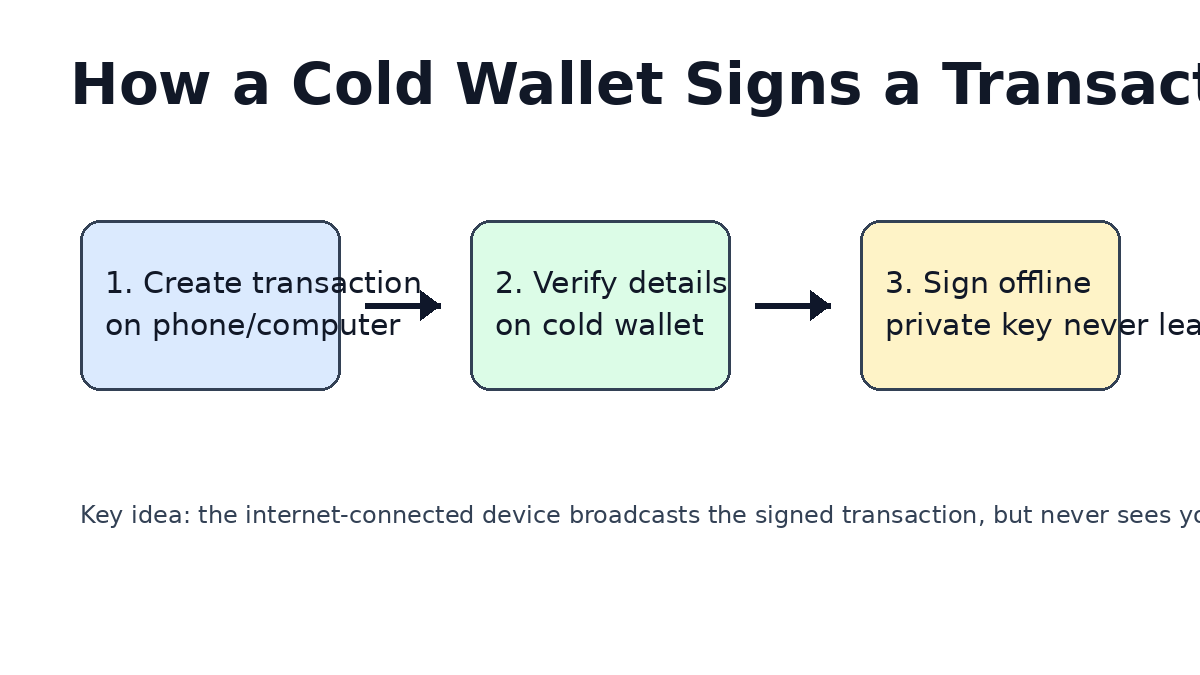
When you want to send crypto, the transaction is created on your internet-connected computer or phone, but the **cryptographic signing** that requires your private key happens inside the cold wallet. Your computer never sees the key — it only receives the signed transaction.
### 3. Signed Transactions Go Online
After signing, the completed transaction is broadcast to the blockchain through your computer or phone’s internet connection. The cold wallet’s private keys remain offline throughout this entire process.
### 4. Your Keys Never Leave the Device
The critical security property: your private keys can never be extracted from a well-designed cold wallet. Even if your computer is completely compromised with malware, the hacker cannot steal your keys — they would need physical access to your hardware wallet.
—
## Cold Wallet vs Hot Wallet: What’s the Difference?
The choice between a cold wallet and a hot wallet comes down to one trade-off: **security versus convenience**. Here’s how they compare:
| Feature | Cold Wallet | Hot Wallet |
|———|————-|————|
| **Internet Connection** | Offline / Air-gapped | Always online |
| **Private Key Location** | Hardware device | Software on phone/computer |
| **Security Level** | Maximum | Vulnerable |
| **Convenience** | Lower (physical device needed) | Higher (instant access) |
| **Best For** | Long-term storage, large amounts | Daily spending, small amounts |
| **Recovery Phrase** | 12-24 word seed phrase | Same seed phrase standard |
| **Physical Theft Risk** | Yes (device can be stolen) | No |
| **Typical Cost** | $50-$300 upfront | Free |
### When to Use Each
**Use a hot wallet for:**
– Small daily spending amounts
– Testing new blockchain applications
– Newcomers learning the ecosystem
– Amounts you can afford to lose
**Use a cold wallet for:**
– Any cryptocurrency holdings over ~$500
– Long-term “HODLing”
– Protecting your life savings
– Any amount tied to a hardware node or DeFi position
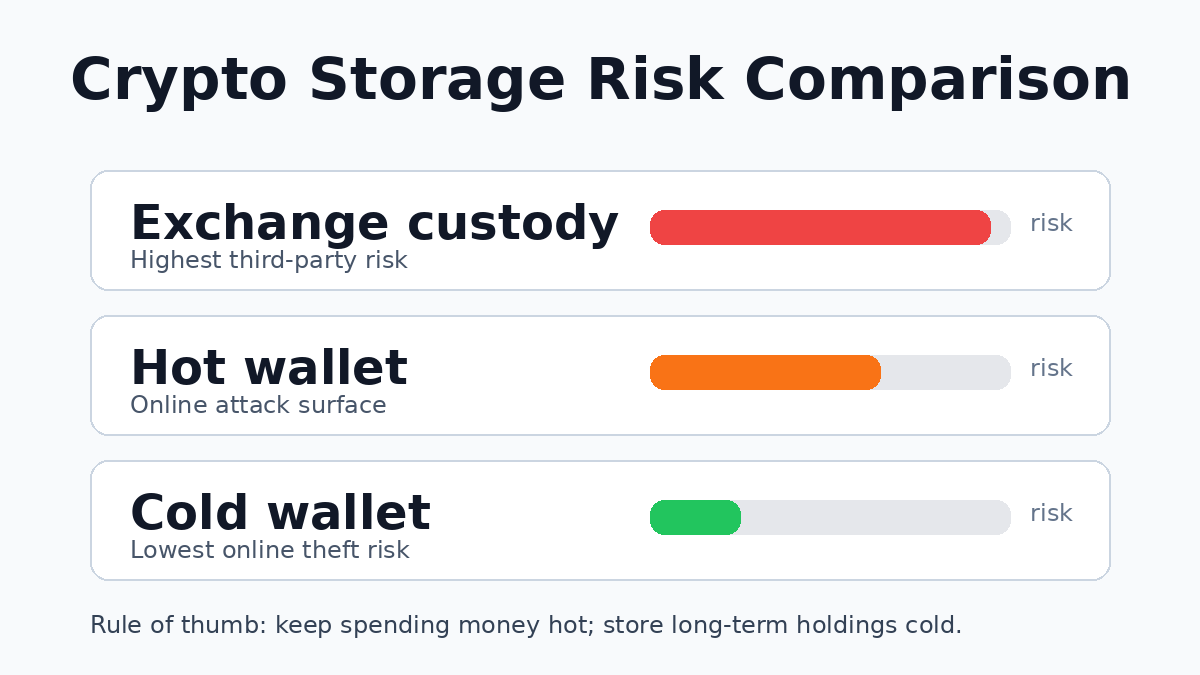
Crypto security experts generally recommend keeping **no more than 1-2 weeks’ worth of spending money** in a hot wallet, and everything else in cold storage.
—
## Why Not Just Keep Crypto on an Exchange?
You might think keeping your crypto on a major exchange like Coinbase or Binance is safe because they are “big and trusted.” The reality is very different.
**Exchanges hold your keys for you.** When you store crypto on an exchange, you technically don’t own the private keys — the exchange does. Your balance is just an IOU from the exchange. This means:
– If the exchange gets hacked, **you lose everything** (as happened with Mt. Gox, FTX, and dozens of others)
– If the exchange freezes your account, **you have no recourse**
– If the exchange goes bankrupt (FTX style), **you become an unsecured creditor**
– You have no control over your assets if the exchange decides to pause withdrawals
The phrase **”not your keys, not your coin”** exists for a reason. Every major crypto security incident in history has followed the same pattern: people trusted a third party with their keys, and that third party failed.
A cold wallet solves this at the foundation. Your keys never leave your possession, and no exchange hack or corporate collapse can take your crypto.
—
## What Are the Main Types of Cold Wallets?
Not all cold wallets are created equal. Here’s a breakdown of the different types:
### Hardware Wallets — The Gold Standard
Hardware wallets are dedicated physical devices purpose-built for storing cryptocurrency private keys. They are the most recommended type for serious crypto security.
**How they work:** A secure chip (often with Common Criteria EAL5+ certification) generates and stores private keys. The device has a small screen for verifying transaction details and physical buttons for confirming actions. Even if your computer is completely compromised, the hardware wallet’s keys cannot be extracted.
**Key brands in 2026:**
– **The Ledger lineup** uses a proprietary Secure Element chip with Common Criteria EAL5+ certification. It supports thousands of cryptocurrencies, with current devices including Stax (touchscreen), Flex (touchscreen), Nano X (Bluetooth), and Nano S Plus (budget).
– **The Trezor lineup** focuses on open-source hardware-wallet design and full code transparency. It supports approximately 1,500 coins and tokens, with current devices including Safe 7 (flagship), Safe 5, Safe 3, and Model One.
– **The COLDCARD lineup** is Bitcoin-only and designed for maximum security, with air-gapped signing and features such as Duress PINs.
– **The Foundation Passport** is a premium Bitcoin hardware wallet that uses camera-based QR communication, microSD support, and no Bluetooth or wireless communication.
### Paper Wallets — Old School, High Risk
A paper wallet is simply a printed piece of paper containing your private keys and public addresses in QR code or text form.
While technically offline, paper wallets are considered obsolete and risky because:
– The paper can be lost, damaged, or destroyed
– Printing introduces security risks (printer memory, network printers)
– Physical theft is easy
– No easy way to update or manage funds
– One typing error can lose funds permanently
**Verdict:** Hardware wallets have made paper wallets largely obsolete. Avoid them unless you have a very specific use case and understand the risks fully.
### Air-Gapped Computers
An air-gapped computer is a dedicated offline computer that has never and will never connect to the internet, used solely for cryptocurrency key generation and transaction signing.
This approach can offer high security but is impractical for most users because:
– Requires a dedicated, permanently offline computer
– Setup and maintenance require technical expertise
– Software updates are difficult
– Physical security of the entire computer is required
– Not portable
**Verdict:** The theory is sound, but hardware wallets deliver equivalent security with a fraction of the inconvenience.
—
## What to Look for When Choosing a Cold Wallet
Not every hardware wallet is equally good. Here are the key factors to evaluate:
### Security Architecture
**Secure Element:** Some hardware wallets use a dedicated secure chip that is certified against physical and software attacks. Others rely on transparent open-source firmware and different hardware architecture choices. Both approaches can be secure with proper implementation, but Secure Element chips offer a higher security ceiling against certain physical attacks.
**Open-Source Code:** Wallets with fully open-source firmware allow the security community to audit the code for vulnerabilities. This doesn’t automatically mean they’re more secure, but transparency is generally viewed favorably in the crypto security community.
**PIN Protection:** Every hardware wallet should require a PIN code to access the device. Look for wallets with anti-brute-force measures (wipe after X failed attempts).
**Passphrases (BIP39):** Most hardware wallets support an optional passphrase layered on top of your recovery seed — this creates a hidden wallet that even physical theft can’t access without the passphrase.
### Coin and Token Support
Before buying, confirm the wallet supports the specific cryptocurrencies you hold. Most major hardware wallets support Bitcoin, Ethereum, and thousands of ERC-20 tokens, but the exact number and quality of support varies.
The Ledger ecosystem supports thousands of coins and tokens through Ledger Wallet and third-party wallets; current product pages reference **15,000+ supported crypto** for some devices.
The Trezor ecosystem supports thousands of coins and tokens through Trezor Suite and third-party wallets; GetColdWallet previously verified the searchable coin list at roughly **1,500+ assets**.
If you’re holding newer DeFi tokens or less common chains, verify compatibility before purchasing.
### User Experience
– **Setup process:** How long does initial setup take? Is it beginner-friendly?
– **Screen:** Does the device have a screen for verifying transaction details? (Yes on most modern hardware wallets — avoid those without screens)
– **Mobile support:** Can you connect to your phone? (Ledger Nano X has Bluetooth, others require USB)
– **Companion app:** Is the software wallet (like Ledger Live or Trezor Suite) well-designed and regularly updated?
– **Recovery:** How does the wallet handle backup and recovery if the device is lost or damaged?
### Price Range
Hardware wallet prices in 2026 typically range from:
– **$49-$79** — Entry level and budget models, including devices such as Ledger Nano S Plus, Trezor Model One, and Trezor Safe 3
– **$99-$159** — Mid-range and mobile-friendly models, including devices such as Ledger Nano X and promotional/bundle configurations
– **$219-$279** — Premium touchscreen models, including devices such as Trezor Safe 5, Trezor Safe 7, and Ledger Flex
– **$300+** — Ultra-premium devices such as Ledger Stax
Prices vary by region and retailer. All hardware wallets pay for themselves many times over if they prevent even a single theft.
—
## Setting Up Your First Cold Wallet: A Quick Start Guide
Getting started with a hardware wallet takes about 20-30 minutes. Here’s what the process generally looks like:
### Step 1: Buy from the Official Source
**Only buy hardware wallets directly from the manufacturer’s website or authorized resellers.** Second-hand hardware wallets are a known theft vector — the previous owner may have recorded the recovery phrase.
### Step 2: Unbox and Verify
When your wallet arrives:
– Verify the holographic seal is intact
– Check that the packaging has not been opened
– Confirm the device shows no signs of tampering
– **Never** use a device that appears to have been opened or modified
### Step 3: Initialize and Record Recovery Phrase
Power on the device and follow the setup wizard. You will be asked to:
– Create a PIN code
– Generate a recovery phrase (typically 12 or 24 words)
– **Write this down on paper — never screenshot, never store digitally**
– Store the paper in a secure location (safe, lockbox, bank deposit box)
– Consider making two copies stored in separate physical locations
### Step 4: Install the Companion App
Download the official companion app (Ledger Live or Trezor Suite) from the manufacturer’s official website. Connect your hardware wallet via USB or Bluetooth and complete the setup.
### Step 5: Transfer a Small Test Amount
Before moving your full holdings, send a small test transaction to verify everything works correctly. Send a small amount, confirm receipt, then proceed with larger transfers.
—
## Common Cold Wallet Myths — Busted
**”Hardware wallets can be hacked remotely.”**
Well-designed hardware wallets store private keys in a secure element that cannot be extracted via software. Remote attacks cannot steal your keys — only the device itself can be compromised through physical access or firmware vulnerabilities. Keep your firmware updated to protect against known vulnerabilities.
**”I don’t have enough crypto to need a hardware wallet.”**
If your crypto holdings are worth more than you could comfortably afford to lose, they deserve proper protection. As your portfolio grows, you’ll already have the security infrastructure in place. Starting with a hardware wallet early is always cheaper than learning a lesson the hard way.
**”Hardware wallets are too complicated for beginners.”**
Modern hardware wallets such as Nano X from Ledger and Safe 7 from Trezor are designed specifically for mainstream users. The setup process is straightforward, with clear on-screen instructions and beginner-friendly companion apps.
**”I can just use a strong password instead.”**
No password can protect crypto on an internet-connected device from malware, keyloggers, clipboard hijackers, and phishing sites. A hardware wallet’s security does not depend on the security of your computer or phone — this is what makes it fundamentally different.
—
## Our Pick: Best Cold Wallets in 2026
Based on security architecture, ease of use, coin support, and value for money, here are the hardware wallets we recommend most:
**Best Overall — Nano X from Ledger**
For most users, the [Nano X at $99](https://swiy.co/Ledger1) is the most versatile option: it combines a certified Secure Element, Bluetooth connectivity for mobile users, broad asset support, and a battle-tested security record.
**Best Open-Source Option — Safe 7 from Trezor**
For users who prioritize transparency and open-source code, the [Safe 7 at $239](https://swiy.co/TREZOR) delivers strong security with a color touchscreen, extensive coin support, and the peace of mind that comes with auditable firmware.
**Best Budget Pick — Safe 3 from Trezor**
At $79, the [Safe 3](https://swiy.co/TREZOR) delivers solid cold storage security at an entry-level price point — ideal for beginners or those looking to secure a second backup wallet.
—
## Frequently Asked Questions
**Is a cold wallet the same as a hardware wallet?**
Yes, in practice these terms are used interchangeably. A “cold wallet” refers to any wallet that stores keys offline, and dedicated hardware wallets are the most common and recommended form of cold wallet for individual cryptocurrency holders.
**What happens if I lose my hardware wallet?**
As long as you have your recovery phrase (seed words), you can restore access to all your crypto on a new device. When you set up a new wallet (same brand or different), you enter your recovery phrase, and all your keys and addresses are regenerated. Your crypto is only permanently lost if you lose both the device and the recovery phrase.
**Can a hardware wallet be infected with malware?**
Hardware wallets are designed to resist malware infection. The private keys are stored in a secure element that cannot be read by the host computer, and the device’s screen independently verifies transaction details. However, the initial setup and firmware update process involve a USB connection to your computer — only download firmware from the manufacturer’s official website and verify signatures before installing.
**Should I keep a backup hardware wallet?**
For small to medium portfolios, one hardware wallet plus a properly secured recovery phrase is sufficient. For large portfolios, having a second hardware wallet (same or different brand) as a backup, with the same recovery phrase, provides redundancy against device failure or loss. Both devices share the same keys, so either can access your funds.
**What’s the difference between cold storage and a cold wallet?**
“Cold storage” is a general term for keeping cryptocurrency keys offline. A “cold wallet” (hardware wallet) is the device you use to achieve cold storage. Cold storage can also refer to paper wallets or air-gapped computers, but hardware wallets are the most practical and widely recommended form.
—
## The Bottom Line
A cold wallet is the single most important security investment you can make for your cryptocurrency holdings. It transforms your crypto from an IOU held by exchanges or software into true self-custody — where only you control the keys.
If you hold more than a few hundred dollars in Bitcoin, Ethereum, or any other cryptocurrency, a hardware wallet is not an option — it’s a necessity. The cost of a quality hardware wallet ($79-$299) is negligible compared to what it protects.
Start with a reputable hardware-wallet maker, follow the setup guide carefully, and store your recovery phrase safely. Once your cold wallet is configured, managing and transacting with your crypto is straightforward — and the peace of mind of true self-custody is worth every penny.
This article is part of our Hardware Wallet Security Cluster — the most comprehensive security resource online. → Read the Full Security Guide → Most Secure Wallets Ranking


